Flags
Assign Flags to resources to categorise and distinguish Organisations, Applications, and Authorisation Servers.
Flags in Raidiam Connect are metadata labels used to group and identify technical resources across the platform. Created and managed by Trust Framework Administrators (Super Users), Flags form part of the platform’s Reference Data and provide a flexible way to describe attributes, capabilities, or classifications of each resource.
Why Flags Exist
Flags are simple, string-based markers that ecosystems can attach to resources to provide additional descriptive metadata. They function similarly to tags: they do not grant permissions or enable functionality (as Roles do), but instead label or classify a resource to support organisational or operational needs.
Ecosystems can decide entirely for themselves how Flags should be used. Typical patterns include:
-
Tagging Organisations, Applications, or Authorisation Servers with attributes or classifications that help describe their characteristics.
Example:
isFapi1.0Compliantflag with valuetrueindicating an Authorization Server is compliant with FAPI 1.0 Security Profile requirements. -
Indicating whether a resource supports particular services, products, or capabilities.
Example:
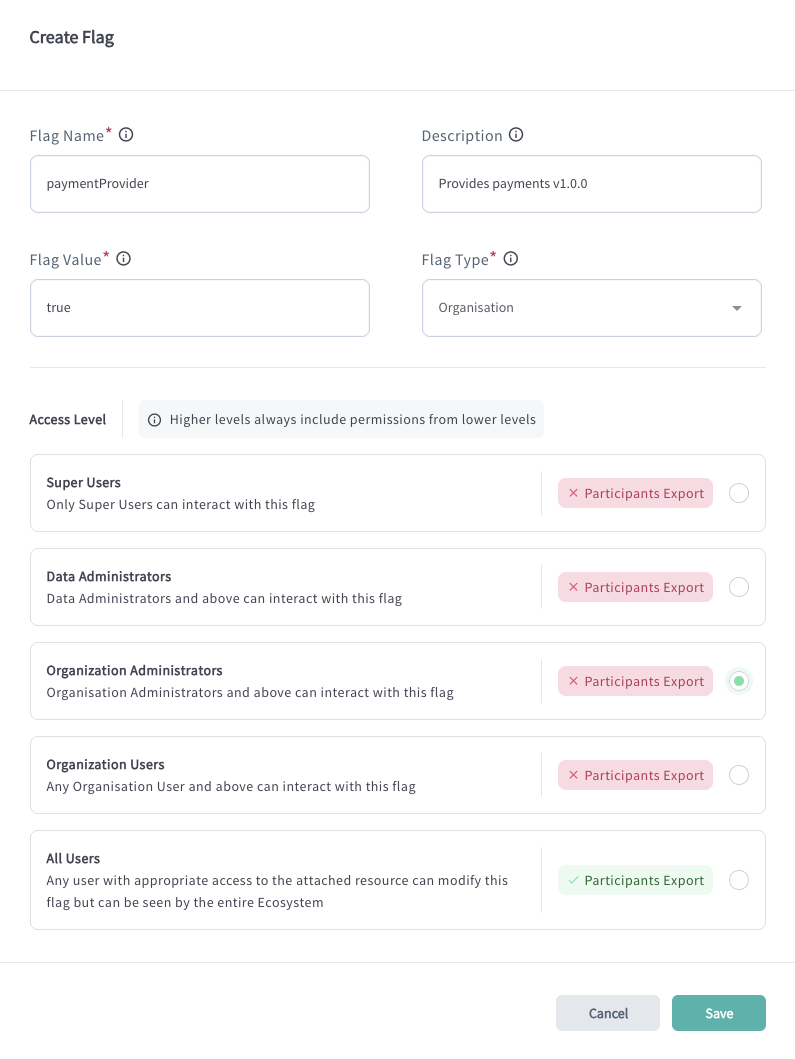
paymentProviderflag with value set totrueindicating the institution supports Payment APIs. -
Adding metadata that enables filtering, grouping, searching, or discovery within the ecosystem.
Example:
DataProviderorTPPflags defining whether an institution offers data for integration or integrates with other institutions to get data.
Raidiam Connect does not prescribe the meaning of any Flag. Each ecosystem defines its own policies and conventions for how Flags are named, when they are applied, and what they signify. Some ecosystems may adopt Flags extensively as part of their governance model, while others may opt not to use them at all.
Where Flags Can Be Applied
Flags can be assigned to:
-
Organisations
-
Applications
-
Authorisation Servers
Flags are applied using the platform UI or via APIs.
Who Applies Flags
The ability to assign a Flag depends on its configured Access Level and the ecosystem’s policy. A Flag may require Super Users or Data Administrators to assign it, or it may be configured so that Organisation Administrators (and any roles with lower privileges) can also apply it to their resources.
Access Levels
Flag Structure
| Field | Description | Example |
|---|---|---|
| Flag Name | Human-readable name that identifies the flag’s purpose. | payment_provider |
| Description | Optional explanatory text providing additional context about how the flag is intended to be used. | Identifies whether an Organisation operates as a Payment Provider. |
| Flag Value | The specific value or option defined for the flag (for example, a status or category). | True |
| Flag Type | The type of resource the flag can be assigned to: Organization, Application (Software Statement), or Authorisation Server. | Organization |
| Access Level | Determines which user roles may view or assign the flag. Higher-privilege roles inherit permissions from lower ones (for example, if Organisation Administrators can assign the flag, Super Users and Data Administrators can do so as well). | Organization Administrator–meaning Organization Admins, Data Admins, or Super Users are able to assign this flag to an Organization |
