Onboarding Applications in OpenID Federation
Learn how to fully onboard applications in ecosystems utilizing OpenID Federation. Enable your client apps to interact with servers, and more.
Prerequisites
Organization has one or more Roles assigned.
If your organisation has no role assigned, contact with your Trust Framework Administrator to have one assigned.
Start Adding Application in OpenID Federation
-
Navigate to the Organization within which you want to onboard the application.
-
Select Applications > New Application.
Assign Roles to Application in OpenID Federation
You can only assign roles to your Application that are already assigned to your Organization.
In the context of Applications, roles define what are the permissions your application has within an ecosystem. They control, for example, what grant types the application can use, what scopes it can request, and more.
Roles bind the configured metadata to your application (relying party). The
bound metadata is then exposed within /.well-known/openid-federation responses
under the metadata key. In other words, the metadata informs the metadata
policies within subordinate statements issued by the Raidiam Connect platform.
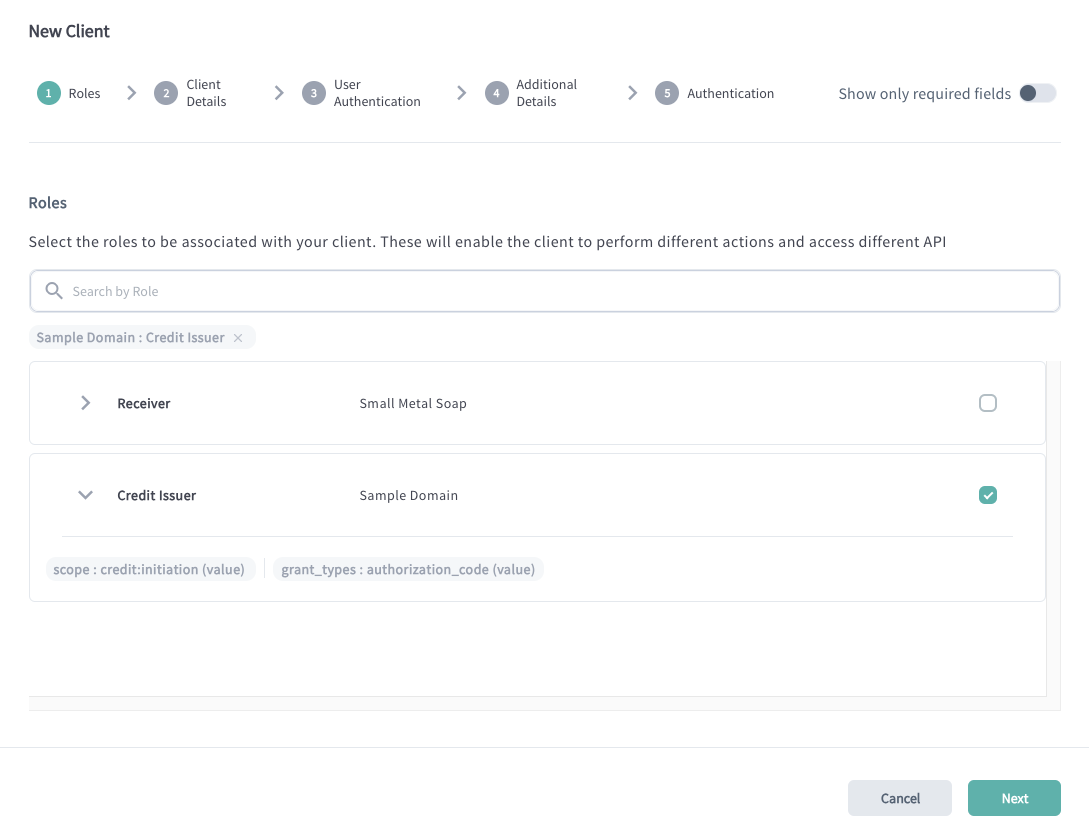
You can search by Roles assigned to your Organization. If you expand the role,
you can check what type of metadata is bound to the role. In the example above,
you can see that your application will be able to request the
credit:initiation scope and use the authorization_code grant type to
initiate Credits.
Provide Application Details in OpenID Federation
Federation Settings
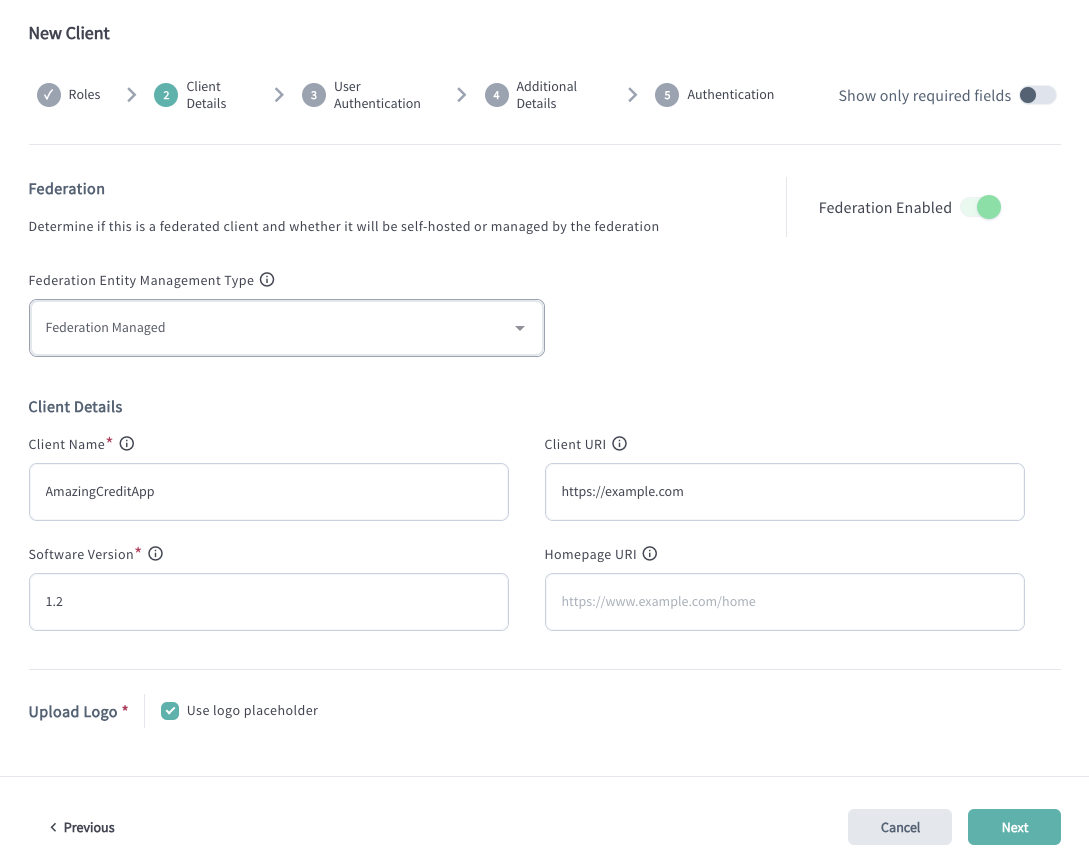
Configure Federation settings.
-
Enable the Federation Enabled setting.
Applications that provide services to end users within a Federation must always be configured as Federation Enabled. This ensure they operate within the Federation, allowing for secure and standardized interactions.
If your application is only intended to interact with Raidiam Connect– such as executing a Single Sign-On (SSO) flow or retrieving information from other participants–it does not need to be federation-enabled. In such cases, the application should not be marked as "Federation Enabled" because federation is not required for these interactions.
-
Determine whether the client will be self-hosted or managed by the federation.
An openid relying party can added be in one of two modes:
-
Federation Managed - the client ID is automatically generated for the application and equals its entity ID.
-
Self Managed - designed for Relying Parties that wish to host their own federation
.well-known, the client ID is provided by the Organisation Administrator.
-
-
Client ID (for self-managed apps)
Other Application Details
Provide other application details:
-
Client Name: human-readable name for your application. May be used within the authorization code flow.
-
Software (Application) Version: current version of your application
-
Upload logo or use a placeholder.
Configure User Authentication for Apps in OpenID Federation
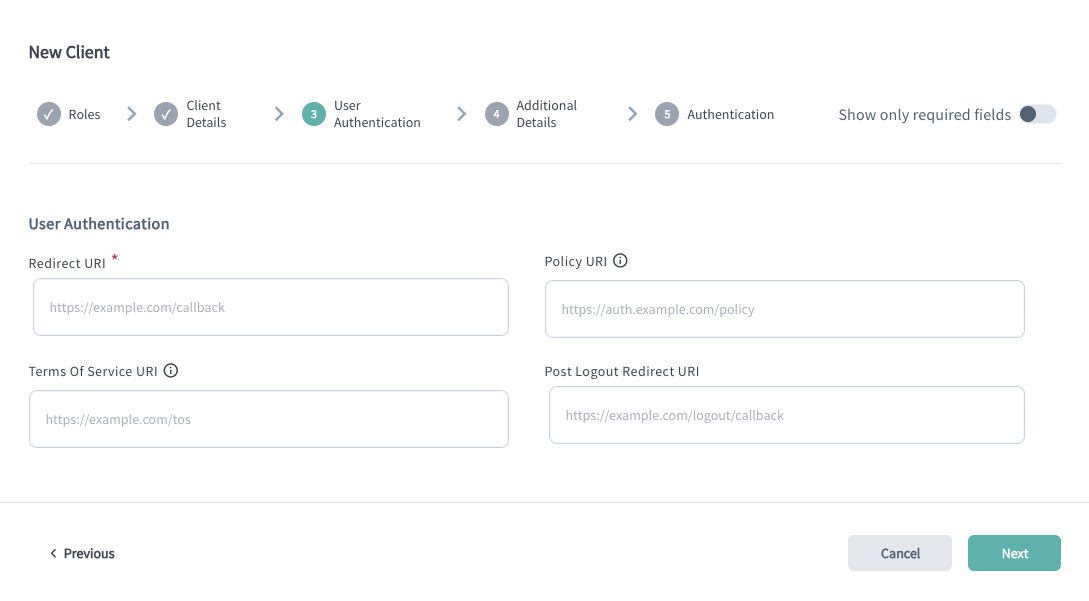
| Setting | Description |
|---|---|
| Redirect URI | Defines the URI where the user gets redirected back after they authenticate and provide consent to share their data. The Redirect URI (also known as the Callback URL) is a list of endpoints specified in the client metadata. These are the URLs where the Authorization Server will redirect users after they have authenticated and authorized access to the application. Providing the Redirect URI list ensures that the authorization code, which results from the authorization flow, is only sent to endpoints controlled by your Organization. |
| Policy URI | URL to the document that defines the application's data storage and usage policies. |
| Terms of Service URI | URL to the document outlining the application's Terms of Service. |
| Post Logout Redirect URI | URI specifying the destination to which the user is redirected upon successful logout. |
Configure Additional Settings for Apps in OpenID Federation
Configure optional settings for application if needed:
| Setting | Description |
|---|---|
| Flags | Flags assigned to the application. These indicate specific settings, policies, or capabilities, depending on the federation’s configuration. For example, administrators may filter for applications that support particular use cases—such as payment initiation. |
| Description | A brief summary describing the application's purpose and key characteristics. |
| Notification Webhook URI | URI of the notification webhook used by servers to receive updates when the application's settings change. |
| On Behalf Of | Identifies the entity on whose behalf the application acts during the authorization code flow. |
| API Webhook URI | URI of the webhook used for API-related notifications. |
| Origin URI | The application's Origin URI. |
Configure Authentication Related Settings for Application in OpenID Federation
Configure how the application authenticates to Raidiam APIs.
| Field | Description |
|---|---|
| Require Signed Request Object | Defines whether the request object needs to be signed while accessing Raidiam Connect's authorisation endpoint according to the OAuth JWT-secured Authorization Request (JAR RFC9101) specification. |
| Token Signed Response Algorithm | Defines the algorithm used to sign access, ID, and refresh tokens issued by Raidiam's Authorisation Server. |
| Token Endpoint Authentication Method | Defines the method of how the client application authenticates with Raidiam's Authorisation Server.One of: tls_client_auth, client_secret_basic, private_key_jwt |
| tls_client_certificate_bound_access_tokens | If enabled, access tokens issued by Raidiam Authorisation Server are bound to the client application's certificate as specified by the OAuth 2.0 Mutual-TLS Client Authentication and Certificate-Bound Access Tokens (RFC8705) section #3. |
| Additional Client Metadata | Extra metadata stored for the client and available in the token introspection process. In the JSON format. |
Add Transport Certificate for Application in OpenID Federation
To enable your application to authenticate securely when interacting with authorization servers and resource servers, you must add a transport certificate.
You can initiate certificate creation directly after creating an application or later.
-
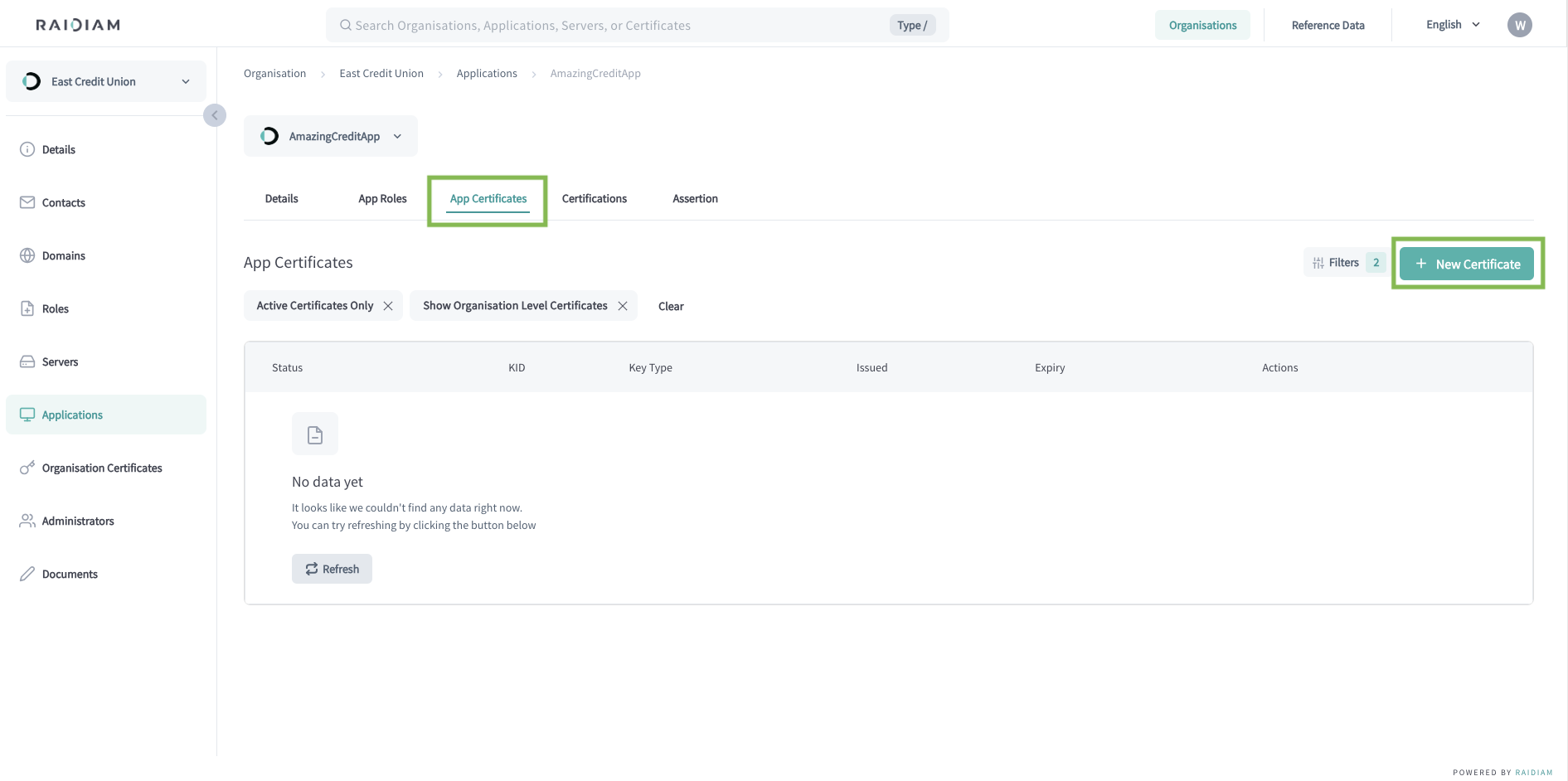
Select Applications > Your Application > App Certificates > New Certificate.
-
Select the TRANSPORT certificate type and Next.
-
Generate a Certificate Signing Request (CSR).
A Certificate Signing Request (CSR) is a block of encoded text that a Trust Framework Participant sends to Registration Authority (RA) to apply for a digital certificate. It contains the information the RA and Certificate Authority (CA) need to create and sign the certificate.
Execute the provided command in your terminal to generate the CSR and continue.
The CSR is generated within the same directory where you executed the command.
Along with the CSR, additional file is created containing the client's Public and Private Keys.
-
Upload the generated CSR/PEM file, select Continue, and Done.
The uploaded request for a certificate is validated by Connect's Registration Authority. Upon successfull validation, the request is passed to the platform's Certificate Authority (CA).
The CA creates the certificate including the organization's public key, subject information, issuer information, validity period, and more. Then, the CA signs the certificate using its private key.
Why You Need Transport Certificates in OpenID Federation
Transport certificates are used for mutual TLS (mTLS), a mechanism where both the client and server authenticate each other during the TLS handshake, ensuring that only trusted applications can access protected endpoints.
We strongly recommend using mTLS for all interactions within your federation, as it provides a higher level of security and prevents unauthorized clients from calling sensitive APIs. Note that transport certificates are not required when accessing publicly available endpoints—such as Raidiam’s participant APIs or other non-protected public resources.
Add Application Certifications (Optional)
If your federation requires app certification, publish certifications for your application.
Register Application at Authorization Server within OpenID Federation
When you create an application in Raidiam Connect, it becomes a registered participant in the OpenID Federation. However, to interact with servers, access APIs, and obtain tokens, the application must also be registered at each Authorization Server within the ecosystem.
In both cases below, use the generated Transport certificate to authenticate your client application to the server using mTLS client authentication.
Within OpenID Federation, client registration can occur in one of two ways:
-
The client can interact with the Authorization Server without prior manual registration. It initiates an authorization code flow (optionally, using Pushed Authorization Requests (PAR)), setting its
client_idto the application’s entity identifier.
The server retrieves and verifies the client’s trust and configuration dynamically from its Federation metadata. -
The client (Relying Party) explicitly registers with the Authorization Server (OpenID Provider) by sending a registration request.
Instead of static metadata, the client provides its Entity Configuration or a Trust Chain.
Once registration is complete, the client can perform standard OpenID authentication and authorization flows.
