Onboarding Applications in Ecosystems with Dynamic Client Registration (DCR)
Learn how to fully onboard applications in ecosystems with Dynamic Client Registration (DCR). Generate Software Statement Assertions, enable your client apps to interact with servers, and more.
Prerequisites
Organization has one or more Roles assigned.
If your organisation has no role assigned, contact with your Trust Framework Administrator to have one assigned.
Start Adding Application in Ecosystem with DCR
-
Navigate to the Organization within which you want to onboard the application.
-
Select Applications > New Application.
Assign Roles to Application in Ecosystems with DCR
You can only assign roles to your Application that are already assigned to your Organization.
In the context of Applications, roles define what are the permissions your application has within an ecosystem. They control, for example, what grant types the application can use, what scopes it can request, and more.

You can search by Roles assigned to your Organization. If you expand the role,
you can check what type of metadata is bound to the role. In the example above,
you can see that your application will be able to request the
credit:initiation scope and use the authorization_code grant type to
initiate Credits.
Provide Application Details in Ecosystem with DCR

Federation Settings
Disable the Federation Enabled setting. Configure Federation settings.
Other Application Details
Provide other application details:
-
Client Name: human-readable name for your application. Used within the authorization code flow to provide information about the app's name to the user.
-
Software (Application) Version: current version of your application
-
Upload logo or use a placeholder.
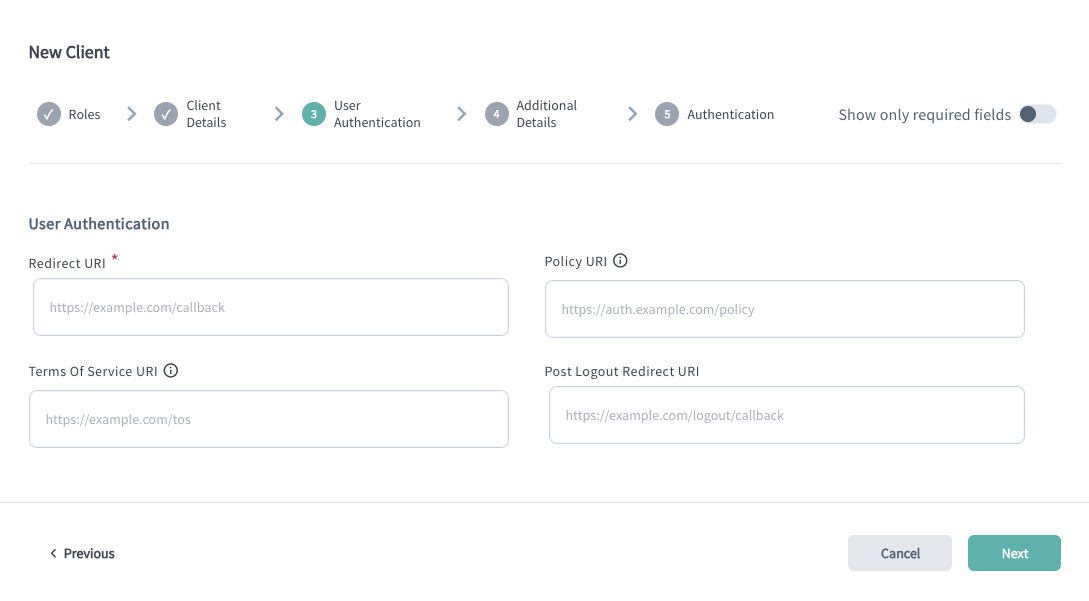
Configure User Authentication for Apps in Ecosystems with DCR
| Setting | Description |
|---|---|
| Redirect URI | Defines the URI where the user gets redirected back after they authenticate and provide consent to share their data. The Redirect URI (also known as the Callback URL) is a list of endpoints specified in the client metadata. These are the URLs where the Authorization Server will redirect users after they have authenticated and authorized access to the application. Providing the Redirect URI list ensures that the authorization code, which results from the authorization flow, is only sent to endpoints controlled by your Organization. |
| Policy URI | URL to the document that defines the application's data storage and usage policies. |
| Terms of Service URI | URL to the document outlining the application's Terms of Service. |
| Post Logout Redirect URI | URI specifying the destination to which the user is redirected upon successful logout. |
Configure Additional Settings for Apps in Ecosystems with DCR
Configure optional settings for application if needed:
| Setting | Description |
|---|---|
| Flags | Flags assigned to the application. These indicate specific settings, policies, or capabilities, depending on the federation’s configuration. For example, administrators may filter for applications that support particular use cases—such as payment initiation. |
| Description | A brief summary describing the application's purpose and key characteristics. |
| Notification Webhook URI | URI of the notification webhook used by servers to receive updates when the application's settings change. |
| On Behalf Of | Identifies the entity on whose behalf the application acts during the authorization code flow. |
| API Webhook URI | URI of the webhook used for API-related notifications. |
| Origin URI | The application's Origin URI. |
Configure Authentication Related Settings for Apps in Ecosystems with DCR
Configure how the application authenticates to Raidiam APIs.
| Field | Description |
|---|---|
| Require Signed Request Object | Defines whether the request object needs to be signed while accessing Raidiam Connect's authorisation endpoint according to the OAuth JWT-secured Authorization Request (JAR RFC9101) specification. |
| Token Signed Response Algorithm | Defines the algorithm used to sign access, ID, and refresh tokens issued by Raidiam's Authorisation Server. |
| Token Endpoint Authentication Method | Defines the method of how the client application authenticates with Raidiam's Authorisation Server.One of: tls_client_auth, client_secret_basic, private_key_jwt |
| tls_client_certificate_bound_access_tokens | If enabled, access tokens issued by Raidiam Authorisation Server are bound to the client application's certificate as specified by the OAuth 2.0 Mutual-TLS Client Authentication and Certificate-Bound Access Tokens (RFC8705) section #3. |
| Additional Client Metadata | Extra metadata stored for the client and available in the token introspection process. In the JSON format. |
Add Transport Certificate for Application in Ecosystems with DCR
To enable your application to authenticate securely when interacting with authorization servers and resource servers, you must add a transport certificate.
You can initiate certificate creation directly after creating an application or later.
-
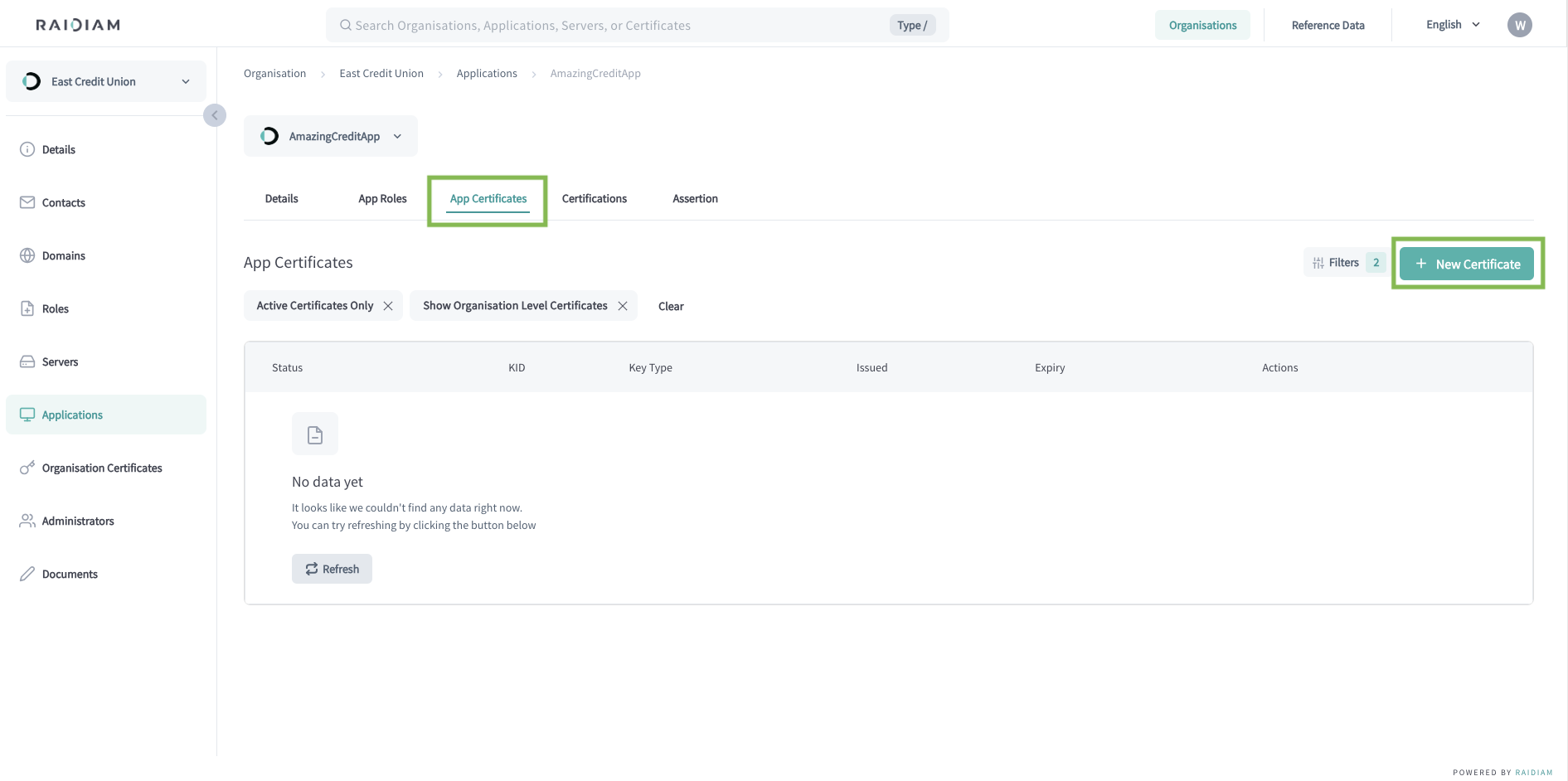
Select Applications > Your Application > App Certificates > New Certificate.
-
Select the TRANSPORT certificate type and Next.
-
Generate a Certificate Signing Request (CSR).
A Certificate Signing Request (CSR) is a block of encoded text that a Trust Framework Participant sends to Registration Authority (RA) to apply for a digital certificate. It contains the information the RA and Certificate Authority (CA) need to create and sign the certificate.
Execute the provided command in your terminal to generate the CSR and continue.
The CSR is generated within the same directory where you executed the command.
Along with the CSR, additional file is created containing the client's Public and Private Keys.
-
Upload the generated CSR/PEM file, select Continue, and Done.
The uploaded request for a certificate is validated by Connect's Registration Authority. Upon successfull validation, the request is passed to the platform's Certificate Authority (CA).
The CA creates the certificate including the organization's public key, subject information, issuer information, validity period, and more. Then, the CA signs the certificate using its private key.
Why You Need Transport Certificates in in Ecosystems with DCR
Transport certificates are used for mutual TLS (mTLS), a mechanism where both the client and server authenticate each other during the TLS handshake, ensuring that only trusted applications can access protected endpoints.
We strongly recommend using mTLS for all interactions within your ecosystem, as it provides a higher level of security and prevents unauthorized clients from calling sensitive APIs. Note that transport certificates are not required when accessing publicly available endpoints—such as Raidiam’s participant APIs or other non-protected public resources.
Add Application Certifications (Optional)
If your ecosystem requires app certification, publish certifications for your application.
Generate Software Statement Assertion for DCR
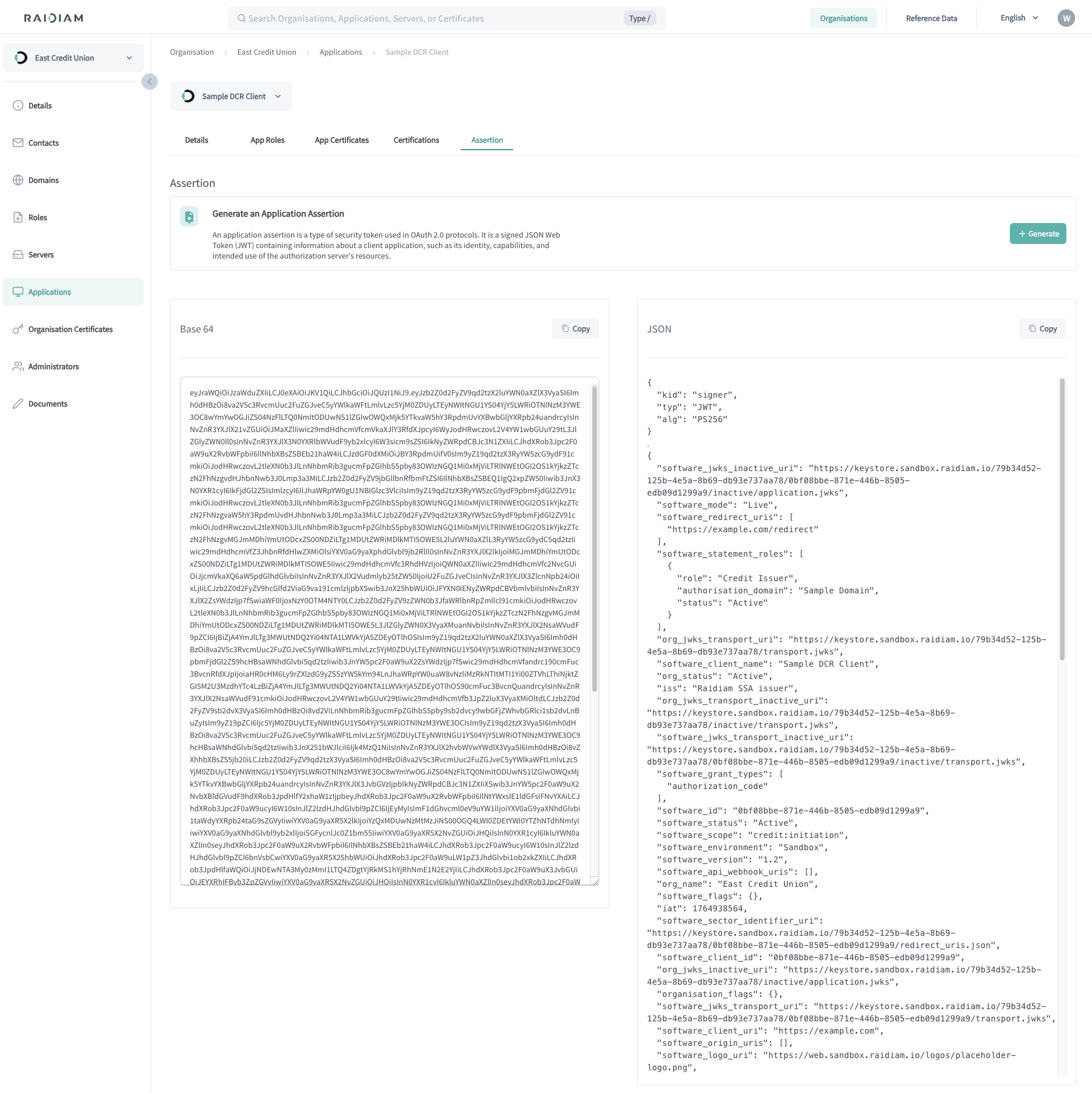
Software Statement Assertion (SSA) is a foundational element for application onboarding for Ecosystems that rely on OAuth Dynamic Client Registration (DCR). An SSA, essentially a signed JSON Web Token (JWT) issued by a Trust Framework, encapsulates information pertinent to an application's identity and operational metadata as defined within the Trust Framework.
Generating a Assertion (SSA) locks an application making it impossible to edit the application details without unlocking the statement first. This happens to prevent unintended changes to applications that are already registered at Authorisation Servers for API access.
If you wish to edit the details or add new roles to the applications's statement, do it before generating an assertion to save yourself additional effort.
Unlocking locked applications can only be done by a Super Administrator.
-
Select Applications > Your Application.
-
Select the Assertion tab.
-
Select Generate.
Register Application at Authorization Server with DCR
OAuth Dynamic Client Registration (DCR) is an API-based mechanism that allows a
client—or a client developer—to obtain a client_id (and optionally
credentials) from an authorization server at runtime by sending client metadata
to a dedicated registration endpoint. Depending on the deployment, the
registration call may be authenticated with an initial access token or include a
software statement. When supported, the client can later read, update, or delete
its registration using the Dynamic Client Registration Management protocol.
High-Level DCR Flow
At a high level, the DCR process consists of three phases: an optional bootstrap step, the registration request, and the registration response. After a client is registered, it uses the credentials it received to perform OAuth flows such as authorization code or client credentials.
Typical steps:
-
Obtain an initial access token (optional):
Some authorization servers protect the registration endpoint and require a dedicated access token. How this token is obtained varies by deployment—for example through an admin console or via a bootstrap client.
-
Prepare client metadata / generate Software Statement Assertion:
The client constructs a metadata document that may include values such as
redirect_uris,grant_types,response_types,token_endpoint_auth_method, and additional OpenID Connect–specific fields likejwks_uriorid_token_signed_response_alg. These can be self-asserted or provided within a software statement issued by a trusted authority. -
Send registration request:
The client submits an HTTPS
POSTwith metadata encoded as JSON. If required, the initial access token is sent in theAuthorizationheader. -
Process registration response:
The authorization server responds with the newly issued
client_id, any associated secrets, the final client metadata, and optionally a registration access token and a dedicated client configuration endpoint for future management.
Security Mechanisms
Because DCR exposes a registration interface, authorization servers typically apply safeguards:
-
Initial access tokens: Used to protect the registration endpoint and limit who can create clients. Tokens often have narrow scope and short lifetimes.
-
Software statements: JWTs containing verified client metadata issued by a trusted authority, allowing the AS to enforce ecosystem policies.
-
Strong client authentication: Registered clients may be required to use higher-assurance methods such as mutual TLS or
private_key_jwt, especially in regulated ecosystems.
Management Operations
When the Dynamic Client Registration Management protocol is supported, a registered client can manage its configuration via a dedicated client configuration endpoint using a registration access token.
Core operations include:
-
Read: Retrieve the stored metadata, including any normalization or adjustments applied by the server.
-
Update: Modify the client’s metadata using
PUTorPATCH; servers may rotate credentials as part of the update. -
Delete: Deregister the client, after which the
client_idcan no longer be used to obtain tokens.
Simplified Lifecycle Overview
| Phase | Client Action | Authorization Server Behavior |
|---|---|---|
| Bootstrap | Acquire access token or software statement | Issue or validate bootstrap credentials |
| Registration | POST metadata to registration endpoint | Validate, register, issue client_id and credentials |
| Configuration access | Call configuration endpoint with registration token | Return stored metadata or an appropriate error |
| Metadata update | Send updated metadata | Validate changes, update state, rotate secrets |
| Deregistration | DELETE registration | Remove registration and disable issued credentials |
This lifecycle can be profiled or extended by specific ecosystems—such as open banking, national trust frameworks, or vendor-specific implementations—while still following the core DCR model.
