Access Scopes
An access token scope is a parameter used in OAuth to define the specific
permissions or actions that the access token allows when accessing a resource on
behalf of a user. Scopes help control the level of access granted to the
application, ensuring that the token only has the permissions necessary for the
requested operation.
Using Access Scopes
An application can request one or more scopes. This information:
-
Must be included in the call to the PAR endpoint, OAuth Authorization Endpoint, and OAuth Token Endpoint.
-
Is presented to the user in the consent screen (after the call to the OAuth Authorization Endpoint)
The access token issued to the application is limited to the scopes granted by the user -- for OAuth Authorization Code Flow -- and to scopes requested by the applications in machine-to-machine scenarios using the OAuth Client Credentials Flow.
In Raidiam, the scopes your application can request are determined by the application's Role and its associated Metadata.
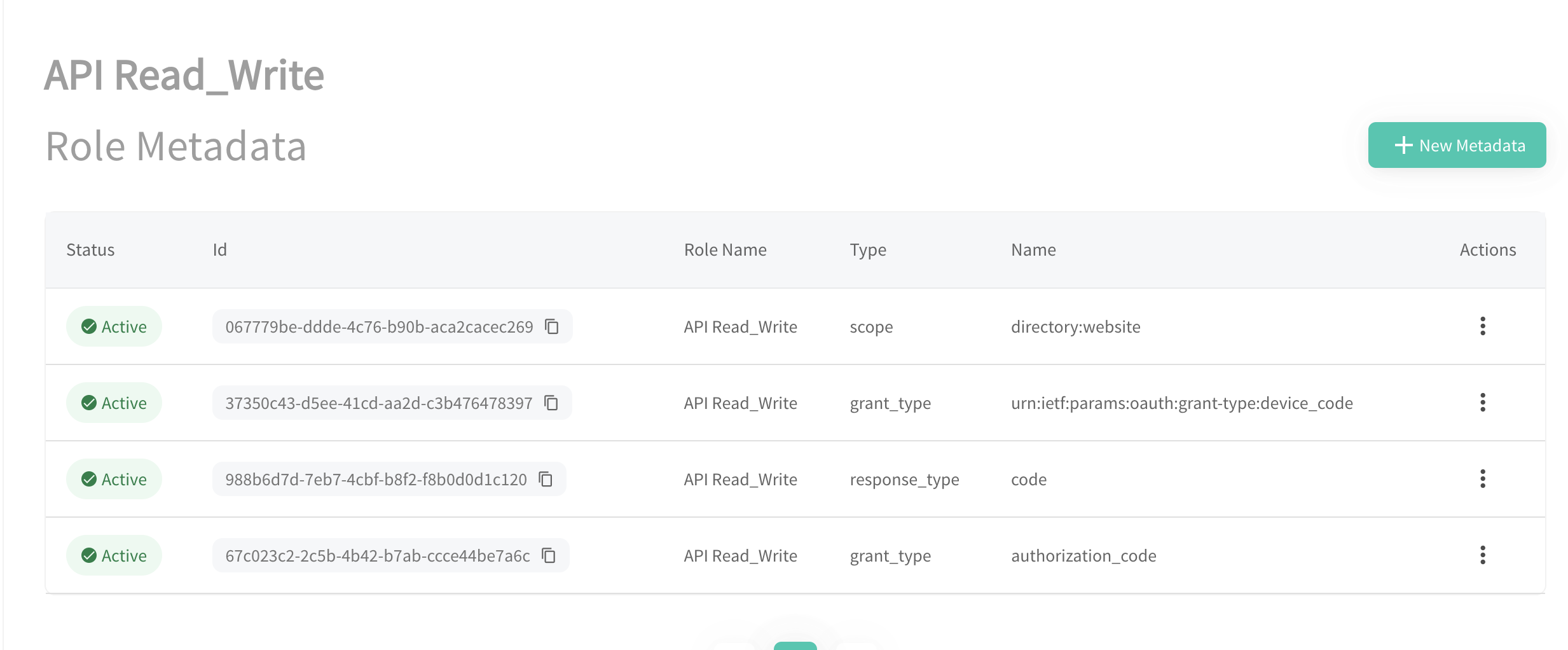
To request the directory:websitescope, the application needs to have the scope Role Metadata Type assigned with the value set to directory:website.
In Raidiam, all applications are assigned the client_credentials flow and directory:software scope by default.
Note that the application Role is not the value of the scope parameter.
Available Raidiam Access Scopes
Applications can use the following scopes to access Raidiam APIs:
directory:software
Used for client-management-related operations like getting a list of all applications registered within the ecosystem or federation, generating Software Statement Assertions, scanning for new Data Receiver applications, retrieval of public certificates, and more.
Additionally, with the directory:software scope, you can perform READ
operations on all resources available within the Trust Framework.
Application that has a token with the directory:software scope can perform
WRITE operations only on the APIs related to this application. In other
words, an application with this scope can request, for example, an
application-level certificate only for itself and not for other application.
Requesting the directory:software scope can be done using the client
credentials flow without involving the users.
directory:software:cert:management
A narrower alternative to directory:software for certificate management
only. Grants read and write access to certificates belonging to the software
statement your application represents.
Requesting the directory:software:cert:management scope can be done using
the client credentials flow without involving the users.
directory:software:organisation:cert:management
Grants read and write access to certificates across your entire organisation, both organisation-level certificates and certificates belonging to any software statement under that organisation, not just the one your application represents.
Requesting the directory:software:organisation:cert:management scope can be
done using the client credentials flow without involving the users.
directory:software:organisation:application:management
Grants read, create, update, and delete access to software statements across your entire organisation (including their authority claims, custom claims, certifications, and assertions), not just the software statement your application represents.
Requesting the directory:software:organisation:application:management scope
can be done using the client credentials flow without involving the
users.
directory:software:user:management
Used to create and update authorisation domain users for an organisation, and to read the related user type and system reference data.
Requesting the directory:software:user:management scope can be done using
the client credentials flow without involving the users.
directory:software:audit
Grants read-only access to the Audit API without requiring a Super User, Data Administrator, or Organisation Admin login.
Requesting the directory:software:audit scope can be done using the
client credentials flow without involving the users.
directory:website
Used by applications to perform web-based operations like administering the underlying Trust Framework, onboarding Organisations, and more on behalf of a Super User, Data Administrator -- a Trust Framework Administrator -- or other User Type with appropriate permissions.
Requesting the directory:website scope implies using the OAuth Authorization
Code Flow and involves authenticating users and getting their consent.
If your organisation needs to get tokens with the directory:website scope in a
machine-to-machine scenario (with the Client Credentials Flow), it can be done
by creating a Role that has such metadata configured and assigning it to the
Organisation and Application. Contact your Trust Framework Administrator to
request such a role.
directory:admin
Used for privileged administrative operations that go beyond what
directory:website or directory:software cover on their own, for example
managing Super Users and Data Administrators, registering Certificate
Authorities in Reference Data, managing OAuth clients directly, and various
platform maintenance operations (such as resetting the JWKS or exporting open
data). The exact set of operations available can vary by ecosystem.
Requesting the directory:admin scope can be done using the client
credentials flow without involving the users. Access to this scope is
restricted; contact your Trust Framework Administrator if your integration
needs it.
directory:servicedesk
Used by service-desk client applications that need read-only access to organisation contacts (including visibility normally reserved for the organisation itself), admin users, and authorisation domain users, along with related authorisation domain and authority reference data, for support and operational purposes. The exact set of data available can vary by ecosystem.
Requesting the directory:servicedesk scope can be done using the client
credentials flow without involving the users.
trust_framework_profile
Scope necessary when using the OAuth Authorization Code Flow and Raidiam Connect as a Single Sign On (SSO) provider to other external platforms.
OpenID Connect Access Scopes
The following OpenID Connect scopes are available to applications using the OAuth Authorization Code Flow:
openid
Used to indicate that the application intends to use OIDC to verify the user's identity.
profile
Used to get basic profile information like the user's name, family name, and more.
email
Used to get the user's email address.
